¶ Device Health Score
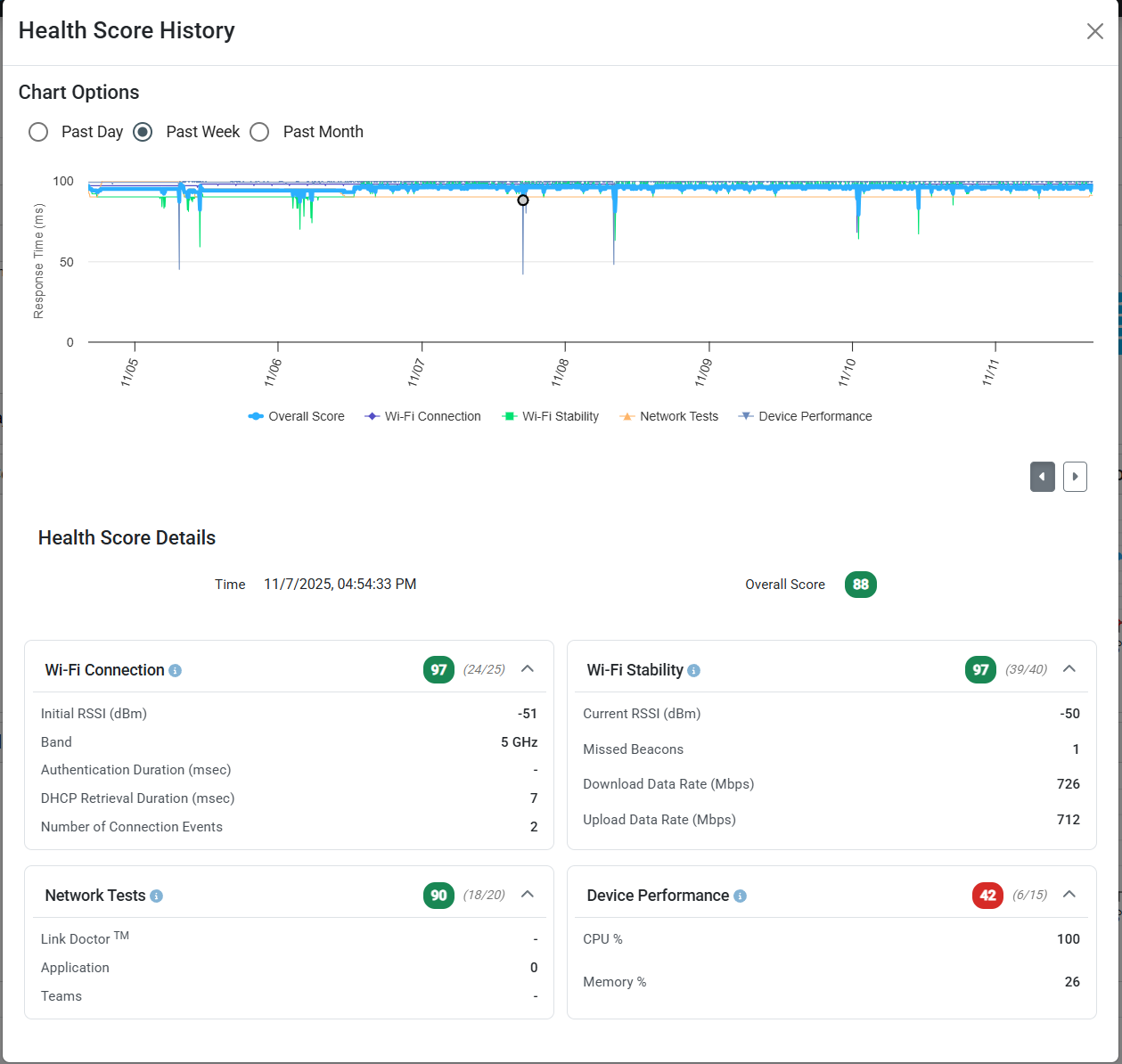
The DEX Agent software automatically calculates a Health Score for every monitored device. The Health Score is designed to holistically evaluate the experience of a device, and is represented as a score out of 100. This article will explain how this score is calculated.
¶ Color Coding
Health scores are color coded on the UI for easy visualization.
| Color | Score Range |
|---|---|
| Green | 85 - 100 |
| Yellow | 51 - 84 |
| Red | 0 - 50 |
¶ Score components
The Device Health Score is calculated from four underlying categories - each has weights which contribute to the final score.
The categories we account for are:
- Wi-Fi Connection - Signal strength at connection, DHCP and RADIUS response time, etc.
- Wi-Fi Stability - Current signal strength, TX/RX data rates, etc.
- Network Tests - Pass/fail rate of the network tests. Requires Network Tests to be enabled
- Device Perormance - Health of the device itself (CPU/RAM)
If any categories have missing data (for example, a device without an active Wi-Fi connection), the score computation will not be negatively effected.
¶ Wi-Fi Connection
This score is meant to evaluate the quality of the most recent network connection. This includes the "onboarding experience" of the client regarding (DHCP/RADIUS time) as well as the quality of most recent connection to an AP (RSSI, band).
It's important to understand that this component will remain the same until a new connection / Wi-Fi roam occurs.
¶ RSSI at connection
This is the RSSI of the most recent connection to an AP. It is not to be confused with the current RSSI, which is measured as a part of Wi-Fi Stability. This method identifies cases where a device was not able to connect to an AP at an acceptable RSSI.
¶ Band
This accounts for the Wi-Fi band (2.4GHz, 5GHz, 6GHz) that the client connects to. 2.4GHz connections generally result in the worst performance, and therefore receive the lowest points in this category. 6GHz get the highest score. 5GHz connections also score highly in this category.
¶ Authentication Duration
This is the duration in milliseconds for the 802.1X (RADIUS) auth (if relevant). Higher durations result in a lower score.
¶ DHCP Retrieval Duration
This is the duration in milleseconds for the DHCP process to complete. Higher durations result in a lower score.
¶ Number of Connection Events
This component evaluates over the quantity of new connection events over the time range. The idea behind this is that a device that is changing it's network connection frequently will have a worse user experience, therefore devices with many connection events get lower scores in this category.
¶ Wi-Fi Stability
This component is concerned with the stability of the device's active Wi-Fi connection. It considers factors that impact real-time performance and throughput, such as RSSI and data rates.
¶ RSSI (Current)
This is calculated from the current RSSI/SNR as measured by the client.
¶ Missed Beacons
This unique metric relies on driver level statistics from Intel radios. Missed beacons are reported if the client radio does not hear a beacon frame from the associated BSSID at the expected interval. Missed beacons generally indicate unstable Wi-Fi conditions, and can result in the client device disconnecting.
¶ Download data rate
Wi-Fi data rate in the download (RX) direction. Not to be confused with current network throughput - this is the negotiated layer 2 data rate which represents the maximum rate that data can be modulated and sent over Wi-Fi.
¶ Upload data rate
Wi-Fi data rate in the upload (TX) direction. Not to be confused with current network throughput - this is the negotiated layer 2 data rate which represents the maximum rate that data can be modulated and sent over Wi-Fi.
¶ Network Tests
This component evaluates the most recent network test results. We evaluate over a two hour time range, and calculate over a maximum of 10 results per test-type. This method ensures the score reflects recent performance and accommodates situations where network tests aren't run on a frequent schedule.
¶ Device Performance
This component accounts for the performance of the device itself, from the perspective of resource utilization. We collect both CPU and RAM utilization in 5 minute intervals. The higher the utilization, the lower the device performance score.