¶ Introduction
This document provides an overview of the steps required to configure SAML authentication support on the Wyebot dashboard. This is a high-level overview of the process and is not specific to any one IdP. IdP-specific guides can be found below.
- Configuring SAML SSO with Google Workspace
- Configuring SAML SSO with Microsoft EntraID
- Configuring SAML SSO with Okta
¶ Overview
The Wyebot DEX agent dashboard supports IdP-initiated SAML SSO as a form of multifactor authentication (MFA). This means the browser session starts at the IdP where the user logs in - not at the Wyebot DEX agent dashboard. After a successful authentication, the user’s browser session is redirected to the DEX dashboard where the session is validated and the user is granted access. The main benefit of SAML SSO is that user credentials are only stored locally in an organization’s infrastructure.
All SAML users are treated as Administrators on the DEX dashboard. Limited users are currently not supported for SAML authentication.
You must always have at least one Local user configured on the dashboard. If your organization wishes to exclusively use SAML users, simply keep one Local user account configured on the dashboard. A Local user can have the same username as a SAML user.
¶ Terms Used in This Document
SAML - Security Assertion Markup Language is a standardized method of authenticating and redirecting browser sessions.
SSO - Single Sign-On allows a user to log into one site and reuse credentials across multiple other sites.
Identity Provider (IdP) - The device or provider that performs the authentication. In this example, the authentication is done by Active Directory.
Service Provider (SP) - The service that a user wishes to use. In this example, the SP is the Wyebot cloud dashboard.
SAML User - The user that is attempting to authenticate and access the SP. The user’s credentials are not stored on the SP, only on the IdP.
Consumer URL - The URL an IdP forwards a SAML request to following a successful authentication.
¶ Configuration Steps
The following steps must be completed to allow SAML SSO with the Wyebot dashboard:
- Enable SAML support on the Wyebot DEX agent dashboard and configure IdP information.
- Add the Wyebot service on your IdP
- Configure required attributes for the Wyebot service on the IdP
¶ Configure SAML Support on the Wyebot Dashboard
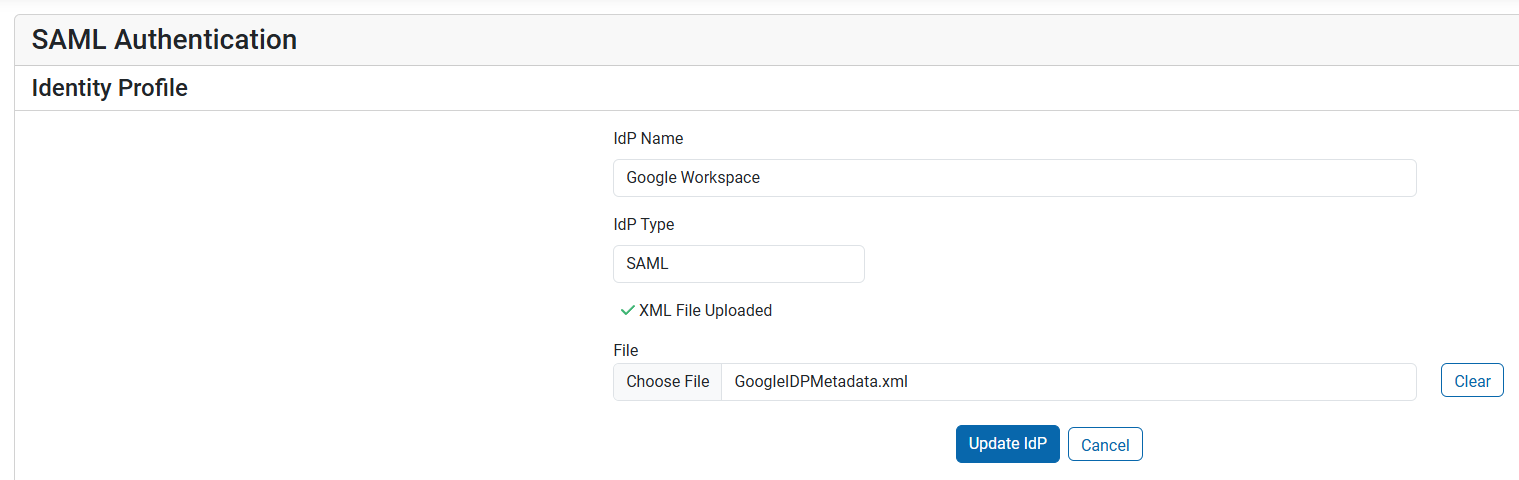
Before enabling the feature, you must first get the XML metadata information from your IdP. Go to the Users page of the DEX agent dashboard and click Add IdP. On the new page, add the following information.
IdP Name: A name to identify this IdP
File: Upload the XML metadata from your IdP
¶ Add The Wyebot Service to Your IdP
The Wyebot service is added to your IdP similarly to any other SAML application. The main thing required when configuring the service is the ACS URL and Entity ID. Your IdP may refer to these by different names, but its the information needed to tell the IdP where to send the SAML assertion after a user is successfully authenticated.
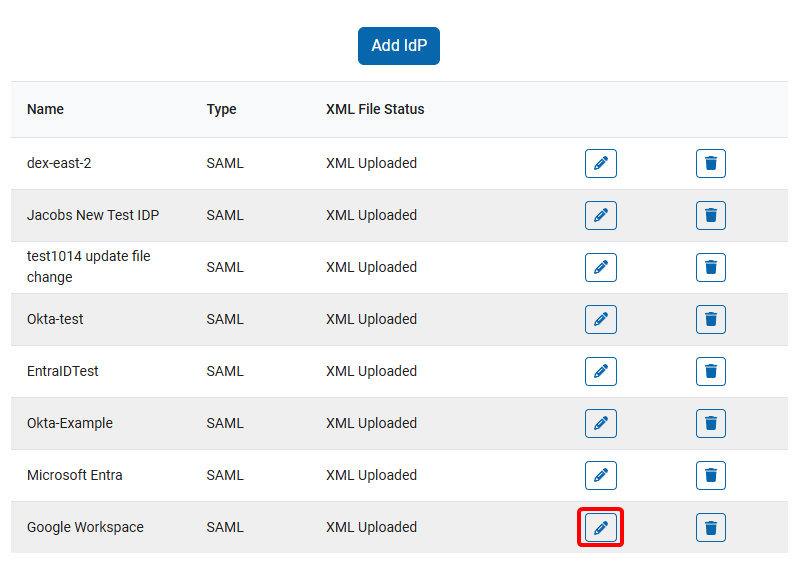
To get your ACS URL and Entity ID from the DEX agent dashboard, click the pencil icon next to the newly added IdP.
¶ Configure Attributes
The IdP must be configured to return certain attributes to the DEX agent dashboard when the user’s browser is redirected after authentication. The attributes are:
| Local IdP Attribute | Outgoing Attribute Name | Status |
|---|---|---|
| Email Address | wyebot-username | Required |
| Full Name | wyebot-fullname | Optional |
| First Name | wyebot-firstname | Optional |
| Last Name | wyebot-lastname | Optional |
Depending on your IdP, the full name of a user may be sent as one attribute, or as separate first and last name attributes. Use the appropriate attributes to send the full identity of the user to the Wyebot dashboard.
If the wyebot-username attribute is not included, the user will not be allowed access to the Wyebot dashboard.